> For the complete documentation index, see [llms.txt](https://docs.magecomp.com/llms.txt). Markdown versions of documentation pages are available by appending `.md` to page URLs; this page is available as [Markdown](https://docs.magecomp.com/magento-2-currency-auto-switcher-extension/configuration.md).
# Configuration
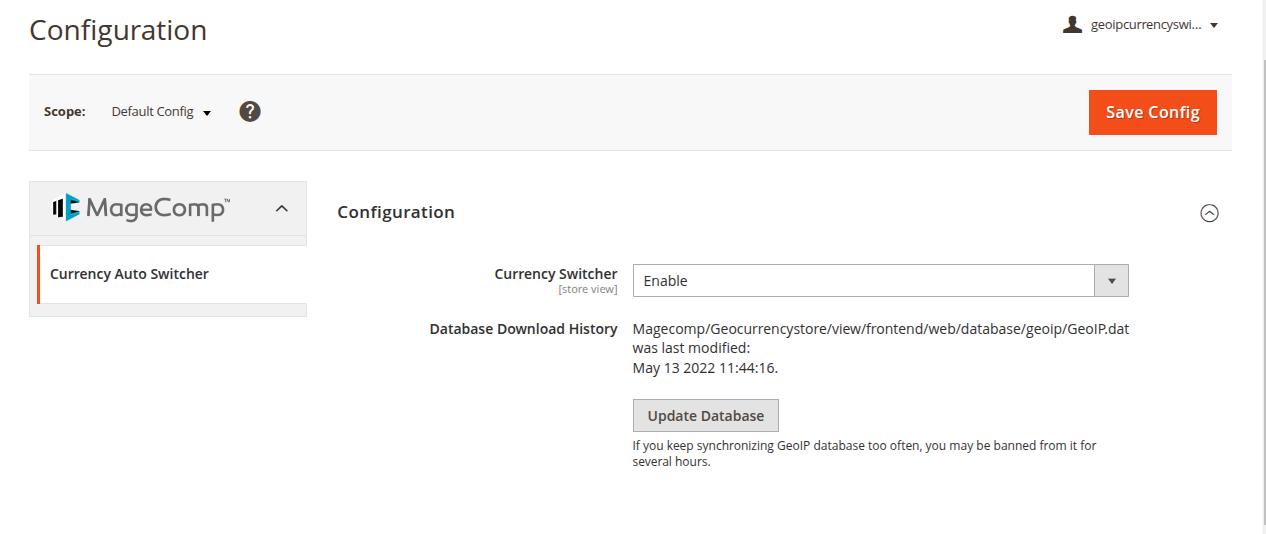
Once you have successfully installed the extension, go to **Stores -> Configuration** to configure the extension for use.
* **Currency Switcher:** Enable or disable the extension from here.
* **Database Download History:** This option will allow you to download a new database and sync with the Database automatically.
Then click on Save Config.
After that, navigate to **Stores > Configuration > General > Currency Setup > Currency Options**.
* **Base Currency:** Select the currency you want to use as the base currency for your store.
* **Default Display Currency:** Choose the currency that will be shown to customers by default on the storefront.
* **Allowed Currencies:** Select one or more currencies you want to allow customers to use on the frontend.
Click Save Config.
After that, navigate to **Stores > Currency > Currency Rate**
Add rates for currencies based on your store’s main currency.
After saving currency rates, the currency configuration will be applied, and the extension will function as expected.