> For the complete documentation index, see [llms.txt](https://docs.magecomp.com/llms.txt). Markdown versions of documentation pages are available by appending `.md` to page URLs; this page is available as [Markdown](https://docs.magecomp.com/magento-2-instagram-feed-widget-pro/configuration.md).
# Configuration
The extension now works with the latest Facebook Graph API, which makes it work fast and smoothly.
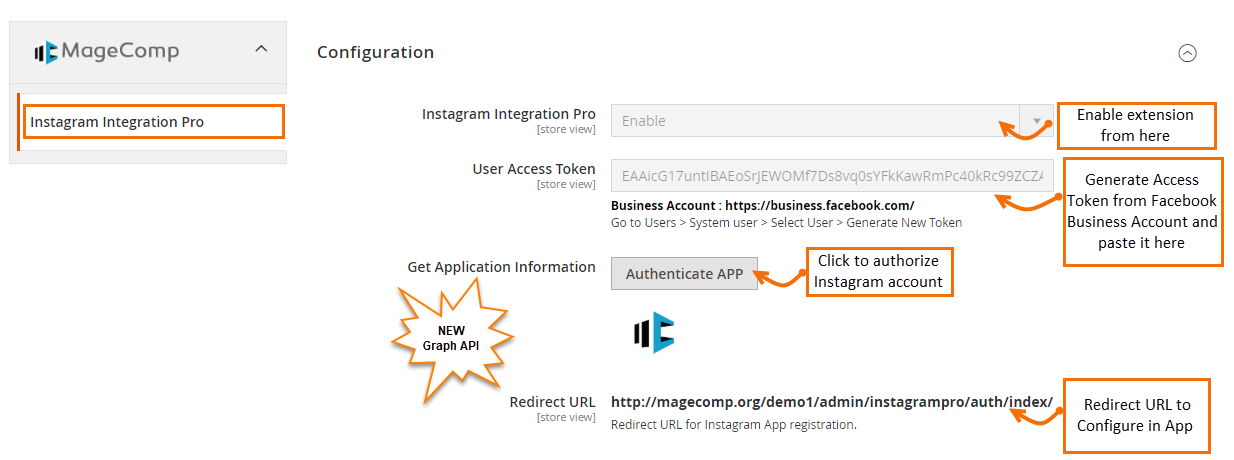
Once you have successfully installed the extension, go to **Stores -> Configuration** to configure the extension for use. Here you can find various settings for the extension.
* **Instagram Integration Pro:** Option to enable or disable extension from here.
* **User Access Token:** [Generate Access Token](https://magecomp.com/support/docs/magento-2-instagram-integration-pro/generate-access-token-facebook/) from Facebook Business Account and paste it here.
* **Get Application Information:** Click on the button to authorize the Instagram account.
* **Redirect URL:** Redirect URL to configure in the app.
**General Settings:**
* **Update Images By:** Option to select to update the Images feed by User or Hashtags.
* **No of Images to Fetch:** Select here the number of images to fetch at once.
**Popup Settings:**
* **Show Navigation in image Popup:** Enable the Navigation inthe feed images popup.
* **Show Popup With:** Select preferred show images by product block or title with a link to show in the popup.
* **Enable Facebook/Twitter/LinkedIn Social Share:** If you selected product blocks to show popup with, you can enable social share options from here.
**Home Page Settings:**
* **Show Slider on Home Page:** Enable to show Instagram images as a slider on the Home Page.
**Note:** For Hyvä, you need to put the below code on the CMS Home Page to show images.
{{block class="Magecomp\Instagrampro\Block\Homepagehyva" template="Magecomp\_Instagrampro::hyva/homepage.phtml"}}
* **No of Images to Show on Home Page:** Set the number of images to show in the Instagram slider. Leave this empty or blank to show unlimited images.
* **Auto Play Slider:** Enable slider autoplay from here.
* **Slider Auto Play Time:** Set the time for Slider auto play.
**Product Page Settings:**
* **Show Images on Product Pages:** Enable to show Instagram images on the product page.
* **No of Images to show on Product Page:** Set the number of images to show on the product page. Leave this empty or blank to show unlimited images.
* **In More View Section:** Enable this to show Instagram Images in the Product More View section.
* **In the Product Detail Section:** Enable this to show Instagram Images in the product Detail section.
* **Title:** Set the title for Instagram feed here.
* **Auto Play Slider:** Enable slider autoplay from here.
* **Slider Auto Play Time:** Set the time for Slider auto play.
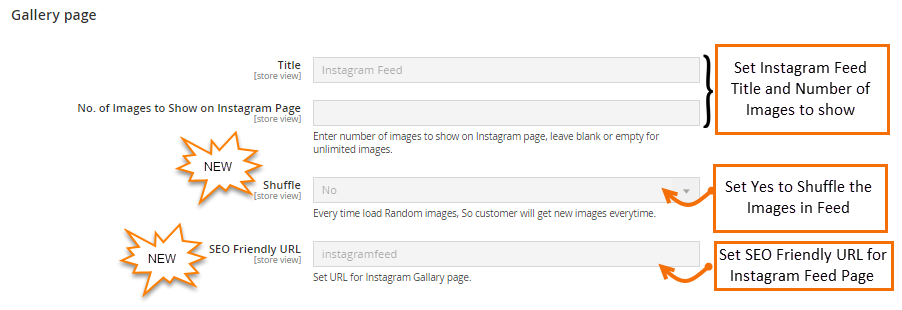
**Gallery Page Settings:**
* **Title:** Set the title for Instagram feed here.
* **No of Images to show on Instagram Page:** Set the number of images to show in the Instagram Gallery page. Leave this empty or blank to show unlimited images.
* **Shuffle:** Set this to yes to shuffle Images in the feed whenever the page loads.
* **SEO Friendly URL:** Set SEO Friendly URL for the Instagram feed page.


 **Gallery Page Settings:**
* **Title:** Set the title for Instagram feed here.
* **No of Images to show on Instagram Page:** Set the number of images to show in the Instagram Gallery page. Leave this empty or blank to show unlimited images.
* **Shuffle:** Set this to yes to shuffle Images in the feed whenever the page loads.
* **SEO Friendly URL:** Set SEO Friendly URL for the Instagram feed page.
**Gallery Page Settings:**
* **Title:** Set the title for Instagram feed here.
* **No of Images to show on Instagram Page:** Set the number of images to show in the Instagram Gallery page. Leave this empty or blank to show unlimited images.
* **Shuffle:** Set this to yes to shuffle Images in the feed whenever the page loads.
* **SEO Friendly URL:** Set SEO Friendly URL for the Instagram feed page.