> For the complete documentation index, see [llms.txt](https://docs.magecomp.com/llms.txt). Markdown versions of documentation pages are available by appending `.md` to page URLs; this page is available as [Markdown](https://docs.magecomp.com/magento-2-instagram-shop-extension/configuration.md).
# Configuration
Check out the detailed video on [**How to Generate Instagram Access Token?**](https://youtu.be/JAUYe1A2dp0?si=18pdGiJEJDMEWA7d)
Once the extension is installed successfully, go to Stores > Configuration to configure the extension for use.
* **Instagram Shoppable:** Enable or Disable the extension from here.
* **Generate TSV File:** Generate TSV file to upload products on Facebook catalog.
* **Data Source TSV file URL:** URL of your TSV file shows here after you generate it.
* **User Access Token:** Enter the User Access Token.
* **Get Application Information:** Authenticate your Instagram App.
A TSV file will be generated with all the product details that you can use to quickly upload all your products on Facebook.
* **Show Images on Home Page:** Select Yes to show Instagram Images on your Magento store home page.
**Note –** For Hyva you need to put below code on CMS Home Page to show images
{{block class=”Magecomp\Instagramshoppable\Block\Homepagehyva” template=”Magecomp\_Instagramshoppable::hyva/homepage.phtml”}}
* **No. of Images to show on Home Page:** Mention the number of images to be displayed on Home Page. Keep it blank to show unlimited images.
* **Show Images on Product Pages:** Select Yes to show Instagram Images on your Magento store product pages.
* **No. of Images to show on Product Page:** Mention the number of images to be displayed on Product Page. Keep it blank to show unlimited images.
* **In More View Section:** Select Yes to show Instagram Images on the product more view section.
* **In Product Detail Section:** Select Yes to show Instagram Images on the product detail section.
* **Update Images By:** Option to update Images feed by User or Hashtags.
* **Hashtags:** Selecting Hashtags option in the previous field, will provide this option to add hashtags here.
* **No. of Images to Fetch:** Select here the number of images to fetch at once.
* **Show Navigation in Image Popup:** Enable the Navigation in feed images popup.
* **Show Popup With:** Select preferred show images by product block or title with a link to show in popup.
* **No. of Images to Show on Instagram Page:** Mention the number of images to be displayed on Instagram Gallery page. Keep it blank to show unlimited images.


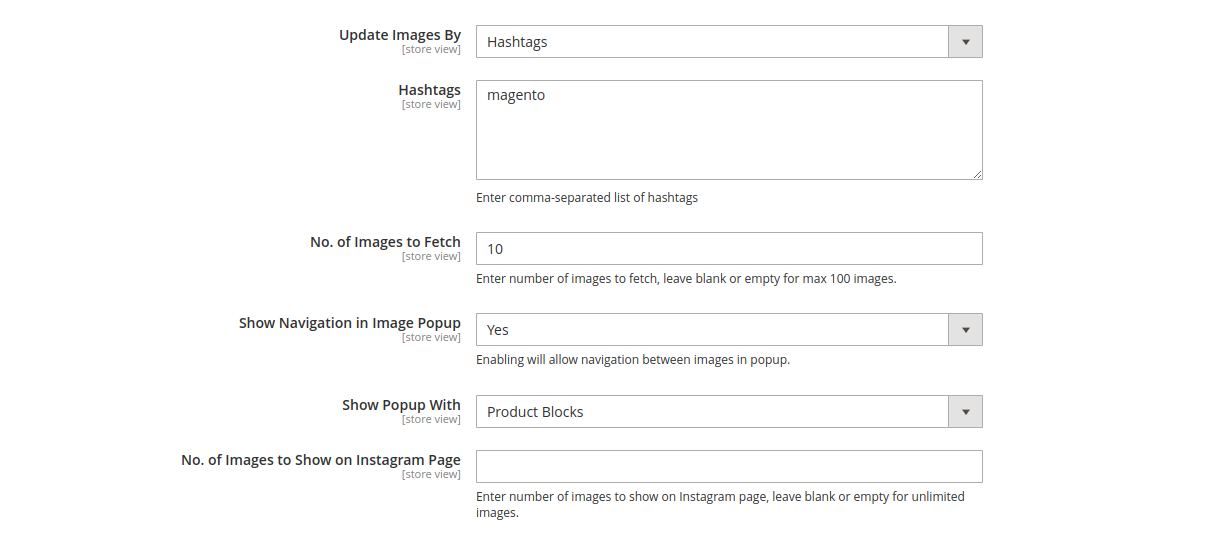 * **Update Images By:** Option to update Images feed by User or Hashtags.
* **Hashtags:** Selecting Hashtags option in the previous field, will provide this option to add hashtags here.
* **No. of Images to Fetch:** Select here the number of images to fetch at once.
* **Show Navigation in Image Popup:** Enable the Navigation in feed images popup.
* **Show Popup With:** Select preferred show images by product block or title with a link to show in popup.
* **No. of Images to Show on Instagram Page:** Mention the number of images to be displayed on Instagram Gallery page. Keep it blank to show unlimited images.
* **Update Images By:** Option to update Images feed by User or Hashtags.
* **Hashtags:** Selecting Hashtags option in the previous field, will provide this option to add hashtags here.
* **No. of Images to Fetch:** Select here the number of images to fetch at once.
* **Show Navigation in Image Popup:** Enable the Navigation in feed images popup.
* **Show Popup With:** Select preferred show images by product block or title with a link to show in popup.
* **No. of Images to Show on Instagram Page:** Mention the number of images to be displayed on Instagram Gallery page. Keep it blank to show unlimited images.