> For the complete documentation index, see [llms.txt](https://docs.magecomp.com/llms.txt). Markdown versions of documentation pages are available by appending `.md` to page URLs; this page is available as [Markdown](https://docs.magecomp.com/magento-2-whatsapp-share-extension/sharing-options.md).
# Sharing Options
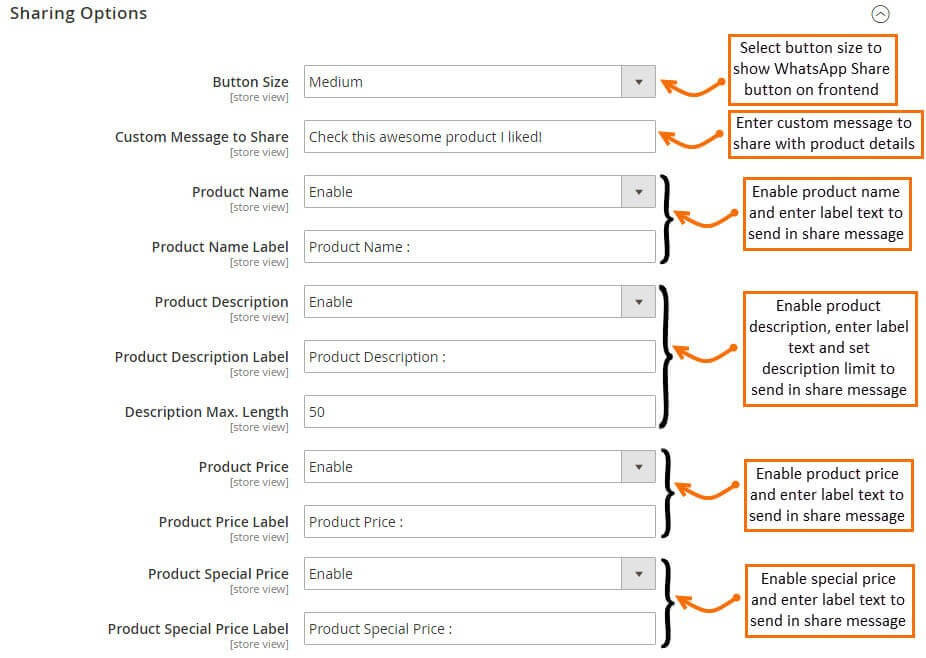
Once you enable the extension, go to Sharing options where you can find various settings for WhatsApp Share button and sharing message.
* **Button Size –** Select WhatsApp Share button size to show on frontend.
* **Custom Message to Share –** Enter custom message to share with product details.
* **Product Name –** Enable to share product name on WhatsApp.
* **Product Name Label –** Set product name label to show in WhatsApp.
* **Product Description –** Enable to share product description on WhatsApp.
* **Product Description Label –** Set product description label to show in WhatsApp.
* **Description Max.** **Length** – Set characters to specify maximum description length.
* **Product Price –** Enable to share product price on WhatsApp.
* **Product Price Label –** Set product price label to show in WhatsApp.
* **Product Special Price –** Enable to share product special price on WhatsApp.
* **Product Special Price Label –** Set product special price label to show in WhatsApp.
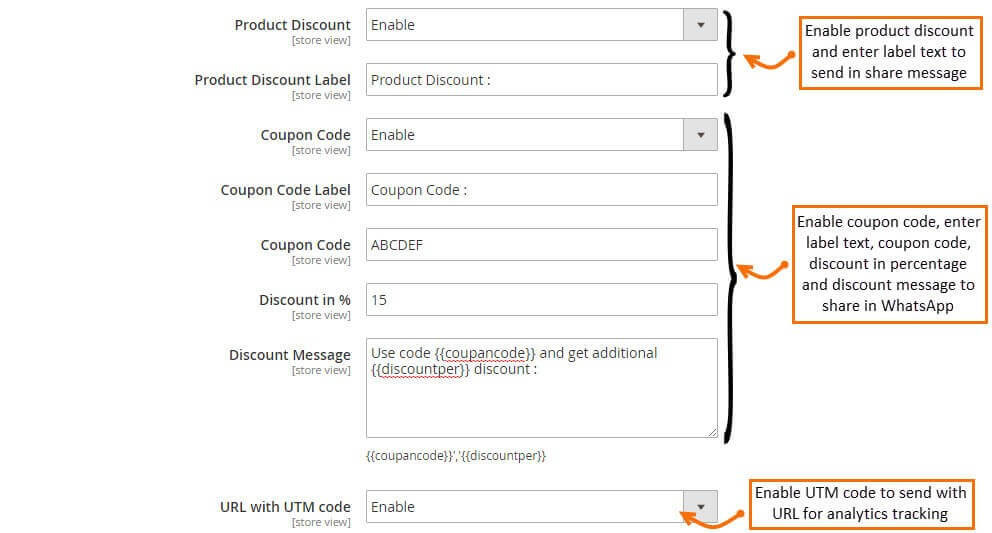
* **Product Discount –** Enable to share product discount on WhatsApp.
* **Product Discount Label –** Set product discount label to show in WhatsApp.
* **Coupon Code** **–** Enable coupon code to share on WhatsApp.
* **Discount in % –** Set discount in percentage.
* **Discount Message –** Enter discount message to share.
* **URL with UTM Code** **–** Enable to send URL with UTM code for analytics tracking.
**NOTE:** WhatsApp Share Extension for Magento 2 is compatible with all Magento Product Types.